How Centralized Preschool Management Systems Help Schools Maintain Full Operational Control

Key Takeaways
- A centralized preschool management system unifies data for admissions, fees, attendance, staff, and inventory in one place.
- Consistency, accountability, and visibility are central to maintaining full operational control.
- Standardized workflows reduce daily errors, prevent disputes, and keep processes efficient.
- Role-based access, approvals, and audit logs strengthen security and governance.
- Real-time reporting and dashboards empower leaders to spot trends and resolve issues quickly.
Defining “Operational Control” in a Preschool (Consistency, Accountability, Visibility)
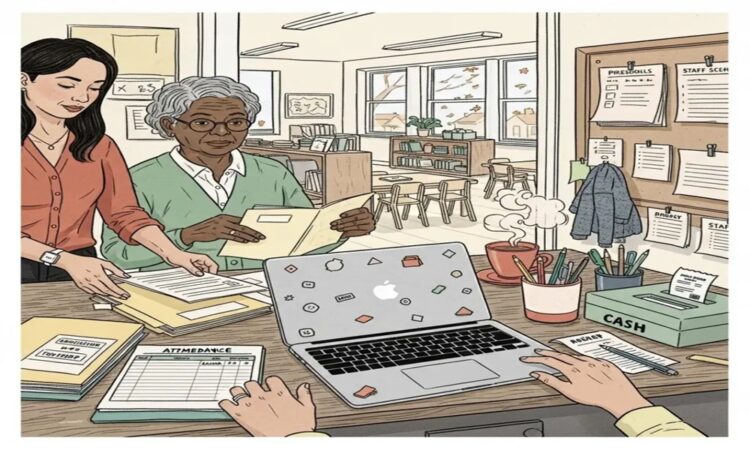
Preschool ERP software is built for one big goal: full operational control. It goes beyond basic preschool management software by putting admissions, attendance, fees, staff workflows, inventory, communication, and reporting into one connected system—one database, one set of rules, one source of truth.
That’s why a centralized preschool management system matters so much when your preschool is growing, handling more classes, or trying to reduce daily errors. An all-in-one approach simplifies operations without losing oversight. If you’re evaluating options, it helps to start with what a solid preschool management system should do for consistency, governance, and day-to-day control.
Operational control means your preschool can run smoothly—even on busy days, even when staff changes, and even when parents have questions—because your processes are reliable. In simple terms, operational control is your ability to manage:
- Enrollment without missing steps
- Fees without confusion or disputes
- Staff schedules and responsibilities without gaps
- Attendance and safety routines without “who did what?” chaos
- Parent communication without mixed messages
A strong preschool ERP software setup supports operational control using three pillars:
1) Consistency (the same process every time)
Consistency is when your preschool follows the same steps for key tasks, like:
- Admissions: inquiry → visit → enrollment → document check
- Attendance: mark daily attendance the same way in every class
- Fees: post charges, discounts, and receipts using the same rules
- Parent updates: notices go out to the right group at the right time
Without consistency, each staff member may “do it their way,” and small differences turn into big problems.
2) Accountability (clear ownership for every action)
Accountability means the system records:
- Who made a change
- When they made it
- What they changed (and sometimes why)
With preschool ERP software, each action is tied to a user identity and timestamp. That reduces mistakes, discourages misuse, and makes reviews easy.
3) Visibility (seeing what’s happening right now)
Visibility means leadership can answer questions quickly, like:
- Which parents have overdues today?
- Are absences spiking in a certain class?
- What approvals are pending?
- Are we short on supplies next week?
For a deeper look at how centralization improves day-to-day visibility, see how centralized preschool management systems improve data visibility and control.
Why Centralization Matters (Single Database, Standardized Processes)
A centralized preschool management system is powerful because everything runs on one shared database. That single source of truth prevents the gaps that happen when tools don’t talk to each other.
Here’s what typically goes wrong with disconnected systems or spreadsheets:
- A child withdraws, admissions updates it, but billing doesn’t → incorrect invoices
- Attendance is edited, but staffing plans don’t adjust → class coverage problems
- Discounts are given informally, with no recorded approval → revenue leakage
- Parent communication lists aren’t updated → messages go to the wrong groups
Centralization fixes this by standardizing processes across the preschool, so every module follows the same rules. This is the real meaning of simplifying preschool operations: fewer handoffs, fewer duplicate entries, and fewer “please re-check the sheet” moments.
If you want a practical baseline for what unification should look like, compare it against the core purpose of a strong preschool management system: consistent operations, clear governance, and reliable information across the school.
Key Areas Centralized Systems Control (Admissions, Attendance, Fees, Staff, Inventory)
A true preschool ERP software approach is not just separate features in one login. It’s modules that work together—so one action updates other connected workflows automatically and correctly.
Below are the key areas where centralized control changes daily life in a preschool.
Admissions & Enrollment (from inquiry to confirmed seat)
Centralized admissions control usually includes:
- Inquiry tracking (who asked, when, what they need)
- Follow-ups and visits
- Seat availability by class (and by branch, if applicable)
- Enrollment checklists and required documents
- A complete student record from day one
Why it improves operational control:
- Staff follow the same steps each time (consistency)
- Missing documents are easier to catch early (visibility)
- Ownership is clearer (accountability)
Attendance (consistent records across classes)
Attendance is not just “present/absent.” A centralized system can support:
- Daily attendance by class or group
- Late pickups or early drop-offs
- Edits with recorded reasons (especially after a cutoff time)
Why it improves operational control:
- Leaders can spot unusual absence spikes fast
- Teachers and admins follow one rule set
- Records are reliable for internal review and parent discussions
Fees, Invoicing, Receipts, and Dues (financial control that holds up under pressure)
Fees are one of the fastest places where small errors become major disputes. Centralized fee workflows can include:
- Fee plans by program/class
- Automated invoice creation
- Receipts with consistent tracking
- Discount/waiver handling with approvals
- Overdue tracking and reminders
- Refund workflows (where supported)
This is where preschool management software becomes ERP-grade: it’s not only recording payments, it’s controlling who can change what and ensuring the financial record is complete and consistent.
Staff Workforce Operations (roles, leaves, responsibility boundaries)
Staff operations in an all-in-one preschool management solution often cover:
- Staff profiles and assigned roles
- Who is responsible for which class
- Leave requests and approvals
- Basic scheduling support (if included)
Why it improves operational control:
- Fewer “I thought someone else was handling it” gaps
- Clearer staffing visibility when attendance changes
- Better accountability because roles match permissions
Inventory & Consumables (track what the preschool uses every day)
Even small preschools manage supplies that can disrupt the day when they run out, such as:
- Art materials
- Cleaning and hygiene supplies
- Pantry items
- Uniforms or school kits (if applicable)
A centralized system can support:
- Stock in/out
- Minimum stock thresholds
- Reorder tracking
Why it improves operational control:
- Fewer last-minute shortages
- Better cost visibility
- Traceable issuance (useful when branches/classes share supplies)
When these areas share the same data, simplifying preschool operations becomes real: admissions updates affect billing, attendance ties into staffing awareness, and inventory alerts prevent daily disruptions.
Role-Based Access and Approvals (Owners, Admins, Teachers, Accounts)
Operational control depends on one simple rule: not everyone should be able to do everything. Preschool ERP software supports control through role-based access and approval checkpoints. This reduces errors and prevents risky actions from happening silently.
Common roles in a centralized preschool management system
Most preschools naturally split responsibilities like this:
- Owner/Director: full visibility, cross-school oversight, approval authority
- Admin/Front office: admissions, communication, day-to-day coordination
- Teacher: attendance marking, classroom updates, observations
- Accounts/Finance: invoices, receipts, reconciliation, refunds processing
Approval checkpoints that protect the school
Approvals are especially important for actions that affect money, records, or trust, such as:
- Discounts and waivers
- Refunds and reversals
- Fee plan changes after enrollment
- Attendance edits after a deadline
- Sensitive edits to student profile details
With a centralized preschool management system, you can set up a clean chain of responsibility so everyone knows what they can do, what needs approval, and what will be logged automatically.
That’s how you get accountability that is practical—not stressful.
Reporting and Real-Time Dashboards (KPIs, Exceptions, Trend Tracking)
Reports are not just for month-end. In a well-run preschool, reporting is how you manage exceptions daily. A strong all-in-one preschool management solution typically provides dashboards that pull from the same live data used by admissions, attendance, billing, and staff workflows. That means leadership sees what’s happening now—not what happened weeks later.
If reporting accuracy is a core priority, align your evaluation with how preschool management software improves reporting and data accuracy in schools.
Examples of useful real-time KPIs
Here are dashboards that directly support operational control:
- Fee overdues by class/branch
- Enrollment funnel conversion (inquiry → visit → admission)
- Attendance trends and sudden absence spikes
- Repeat late pickups (pattern tracking)
- Pending approvals (discounts, refunds, edits)
- Class utilization (capacity vs enrolled)
- Low-stock alerts for inventory below threshold
Why trend tracking matters
Trend views help you answer questions like:
- Are overdues rising month over month?
- Is one class struggling with attendance more than others?
- Are we growing faster in one branch than expected?
Preschool ERP software turns reporting into action by making issues visible early, so policies and staffing can adjust before problems spread.
Multi-Branch or Multi-Class Management (Centralized Oversight with Local Execution)
As soon as you add more classrooms or open a second branch, operational control becomes harder—because inconsistency grows fast. A centralized preschool management system solves this with a simple structure: centralized oversight with local execution.
What “centralized oversight” looks like
Leadership can standardize:
- Fee structures and billing rules
- Receipt formats
- Approval policies for discounts/refunds
- Attendance rules and edit cutoffs
- Document requirements for enrollment
What “local execution” looks like
Branches and classes still operate smoothly because:
- Users only see what they need (branch/class scoping)
- Teachers focus on their classroom tasks
- Admins handle local admissions and communication
- Leaders get consolidated reporting plus branch-level drilldowns
If you’re actively planning growth, this overview of preschool franchise management software explains how centralized systems support multi-location operations.
Reducing Compliance and Audit Risk (Logs, Receipts, Document Storage)
Even if compliance rules differ by region, preschools everywhere handle sensitive data and must maintain trustworthy financial records. Centralization reduces audit risk because the system stores key evidence in one place.
Controls that reduce disputes and audit stress
A well-designed centralized platform supports:
- Audit logs for actions like attendance edits, fee changes, refunds
- Searchable receipts and payment history with consistent records
- Document storage tied to student profiles (enrollment docs, consent forms, required records)
- Approval records so exceptions (like special discounts) are traceable
If your goal is to make secure processes part of daily routine (not an afterthought), align with safe & secure preschool automation so approvals, logs, and records are built into daily work.
Data Security and Continuity (Backups, Permissions, Secure Automation)
When you centralize operations, you also increase your reliance on the system. That’s why security and continuity are core operational requirements.
Permissions that match responsibilities
Preschools should expect:
- Least-privilege access by role
- Separate permissions for sensitive actions (refunds, waivers, edits)
- Controlled visibility of student and parent data
Continuity and reliable access
- Regular backups
- A practical restore plan
- Stable access for authorized staff, without shared logins
Secure automation that builds parent trust
When systems automate payments, receipts, attendance records, and communication, that automation must be secure. Parents trust you with children’s information and financial transactions. Strong controls protect that trust. For a deeper understanding, consult digital safety in preschools.
Choosing the Right Centralized System (Feature Checklist and Pitfalls)
Many platforms claim to be “all-in-one,” but the real question is whether they function as true preschool ERP software—or just a set of features that still behave like separate tools. For a direct comparison of unified systems vs patchwork setups, review what makes an all-in-one preschool management solution more effective than multiple tools.
Feature checklist: what an all-in-one preschool management solution should include
Look for:
- A true central database (not disconnected modules)
- Role-based access with least-privilege defaults
- Approval workflows for sensitive actions (discounts, refunds, edits)
- Audit logs (who did what, when, and ideally why)
- Dashboards and exception reporting (not only static reports)
- Document management tied to student and transaction records
- Backup and recovery readiness (continuity planning)
- Multi-branch support with scoped access and consolidated reporting
Pitfalls and red flags to avoid
Be cautious if you see:
- Data silos (admissions in one place, fees somewhere else)
- Weak permissions (everyone has admin access)
- No audit trail (disputes become impossible to settle cleanly)
- Reporting that can’t drill down by class/branch or show trends
- Hard vendor lock-in without export options
Don’t forget learning workflows (LMS considerations)
Operations are one side of the preschool. Learning and classroom delivery are the other. If your school wants learning data, activity tracking, or digital interaction, check if your platform includes or connects well with a Preschool Learning Management System.
When operational data and learning data live in separate places, staff often duplicate work, and leadership loses visibility. A preschool ERP software approach can unify both sides so your school runs with less friction and more control.
Conclusion: Centralized Systems as the Backbone of Predictable Operations
Preschool ERP software gives schools operational control by turning daily work into standardized workflows that are easy to follow, easy to review, and hard to break. It supports:
- Consistency through shared processes across admissions, attendance, fees, staff, and inventory
- Accountability through role-based access, approvals, and logs
- Visibility through real-time dashboards, KPIs, and exception tracking
A centralized preschool management system is no longer just a “nice to have” if you want growth, stability, and fewer disputes. Choosing an all-in-one preschool management solution is often the fastest path to simplifying preschool operations—without giving up oversight.
If your goal is predictable days, cleaner reporting, and tighter governance across classes or branches, centralization isn’t just software. It’s the operating system for how your preschool stays in control.
FAQ
What is the main benefit of preschool ERP software?
Preschool ERP software unifies all operational tasks in a single system. This leads to consistent processes, clear accountability, and real-time visibility, ensuring fewer mistakes and smoother daily operations.
Can I manage multiple preschool branches with a centralized system?
Yes. A centralized preschool management solution supports a multi-branch setup by standardizing fee structures, attendance rules, and approvals across locations while allowing each branch to execute tasks locally.
What security measures should a preschool ERP offer?
Look for role-based permissions, audit logs, approval workflows, and reliable data backups. Ensuring only authorized staff can access sensitive data is crucial for protecting both financial and personal information.
How does real-time reporting help with operational control?
Real-time dashboards and key performance indicators let preschool leaders spot issues like overdue fees or attendance spikes immediately. This proactive approach prevents small problems from turning into major disruptions.